
A USB C charging cable has become an everyday essential for modern homes, offices, cars, and travel bags. From smartphones and tablets to laptops, headphones, gaming accessories, and power banks, USB-C now supports a wide range of devices through one convenient connection. However, not every cable offers the same charging speed, durability, or data performance, so choosing the right option matters.
Why a USB C Charging Cable Is So Important
The USB-C connector is compact, reversible, and easy to use. Unlike older USB connectors, it plugs in either direction, which eliminates the frustration of finding the correct orientation. More importantly, USB-C can support higher power delivery and faster data transfer than many older charging standards.
In addition, a quality USB C charging cable can provide reliable power for everyday devices while reducing the need to carry several different cables. Many newer phones, tablets, wireless earbuds, cameras, handheld gaming systems, and laptops use USB-C ports. With the right charger and cable combination, one connection can handle both charging and data transfer.
USB-C is also becoming a common standard across manufacturers. As a result, family members can share charging accessories more easily, provided the cable matches each device’s required power level.
USB C Charging Cable and Fast Charging Performance
A fast charging cable does more than connect a device to a wall adapter. It must safely carry the electrical power required for rapid charging. Charging speed depends on several factors, including the wall charger, the device, the cable’s power rating, and the charging protocol that each component supports.
Many modern USB-C cables support USB Power Delivery, commonly called USB PD. This technology allows compatible chargers and devices to communicate and select an appropriate power level. Basic cables may handle lower wattage, while higher-quality cables can support the power demands of tablets and laptops. For technical details, review the USB-IF information about USB Power Delivery.
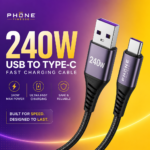
For smartphones, a cable rated for 60 watts may be more than sufficient. Larger laptops may require a cable that supports 100 watts or more. Some newer products require cables rated up to 240 watts under the latest USB PD specifications. Therefore, checking the cable’s wattage rating before purchasing helps prevent slow charging and compatibility problems.
Still, a high-power cable cannot make an incompatible device charge faster than its design allows. The device, charger, and cable must all support the same charging capabilities.
USB C Charging Cable: Choosing a Type C Cable Fast Charge Option
When shopping for a type c cable fast charge solution, look beyond the connector shape. USB-C describes the physical port, but it does not automatically indicate charging speed or data capability. Two cables may look identical while offering very different performance.
Consider these features:
- Power rating: Look for the wattage required by your device and charger.
- Charging protocol support: USB Power Delivery support benefits many current devices.
- Data transfer speed: Some cables handle charging only, while others support fast file transfers.
- Cable length: Longer cables add convenience but may prove less practical for travel or desk use.
- Build quality: Reinforced connectors and flexible insulation can improve durability.
- Certification and labeling: Clear specifications from a reputable manufacturer offer a better buying signal than vague claims.
Furthermore, a cable advertised only as “fast charging” may not provide enough information. Reliable products usually list power output, data speed, supported standards, and compatible devices. For example, a 240 W multi-device charging cable can suit users who need broad device compatibility and high power support.
The Benefits of a Braided Phone Cable
A braided phone cable often suits users who frequently bend, coil, or transport their charging accessories. Braided nylon or similar materials can protect the internal wires from abrasion and reduce damage from repeated twisting.
Additionally, the strongest braided cables include reinforced stress points near the connectors. This area receives significant strain when someone uses a phone while charging or pulls the cable from a tight space. Flexible construction helps the cable bend without placing excessive pressure on the internal wiring.
However, braided designs are not automatically superior. Internal conductors, connector quality, shielding, and manufacturing standards also affect performance. A durable outer covering cannot compensate for poor construction inside. Therefore, look for a braided phone cable with clear specifications and positive reliability indicators instead of choosing solely by appearance.
Multi Device Charging Cable for Home and Travel
A multi device charging cable can reduce clutter by allowing one accessory to serve several products. Some models include interchangeable connectors, such as USB-C, Lightning, and Micro-USB. Others feature multiple USB-C ends or a split design for charging more than one device at the same time.
These cables are especially convenient for travel. Instead of packing separate cables for a phone, headphones, tablet, and power bank, users may carry one compact solution. They also work well in shared spaces where family members own devices with different ports.
Nevertheless, multi-connector cables may not support the maximum charging speed for every connector. Simultaneous charging can also reduce available power, depending on the design and connected charger. Some models support charging only and do not provide reliable data transfer. For important file transfers or high-performance laptop charging, a dedicated cable often works better.
Safety and Compatibility Considerations
A dependable USB-C cable should include proper insulation, secure connectors, and protection against overheating or excessive current. Low-quality cables may use thin internal wires that become hot under heavy loads or fail after limited use.
For safety, avoid cables with loose connectors, exposed wiring, damaged insulation, or unusually high claims without technical details. Stop using a cable if it becomes hot, emits an unusual smell, charges intermittently, or causes repeated connection warnings.
Also, keep the charging port clean. Dust and lint can prevent the connector from seating correctly, which can lead to slow charging or unstable connections. Clean ports carefully with appropriate tools, and never force the connector into place.
How to Get the Best Results
For the best charging experience, match the cable to the device and charger. A high-wattage wall adapter paired with a low-rated cable may limit charging speed. Similarly, a powerful cable connected to a basic charger cannot create additional power.
In addition, use certified or well-reviewed accessories from established manufacturers, especially for laptops and other high-power devices. Store cables loosely rather than tightly folding them, and disconnect them by holding the plug instead of pulling the wire.
With the right specifications and construction, a USB C charging cable can become a dependable universal accessory. Whether the priority is rapid smartphone charging, laptop power delivery, long-term durability, or convenient travel, selecting a cable based on actual performance requirements ensures better value and safer everyday use.